Schema Modifiers
Customize how tools appear to agents
Schema modifiers are part of Composio SDK's powerful middleware capabilities that allow you to customize and extend the behavior of tools.
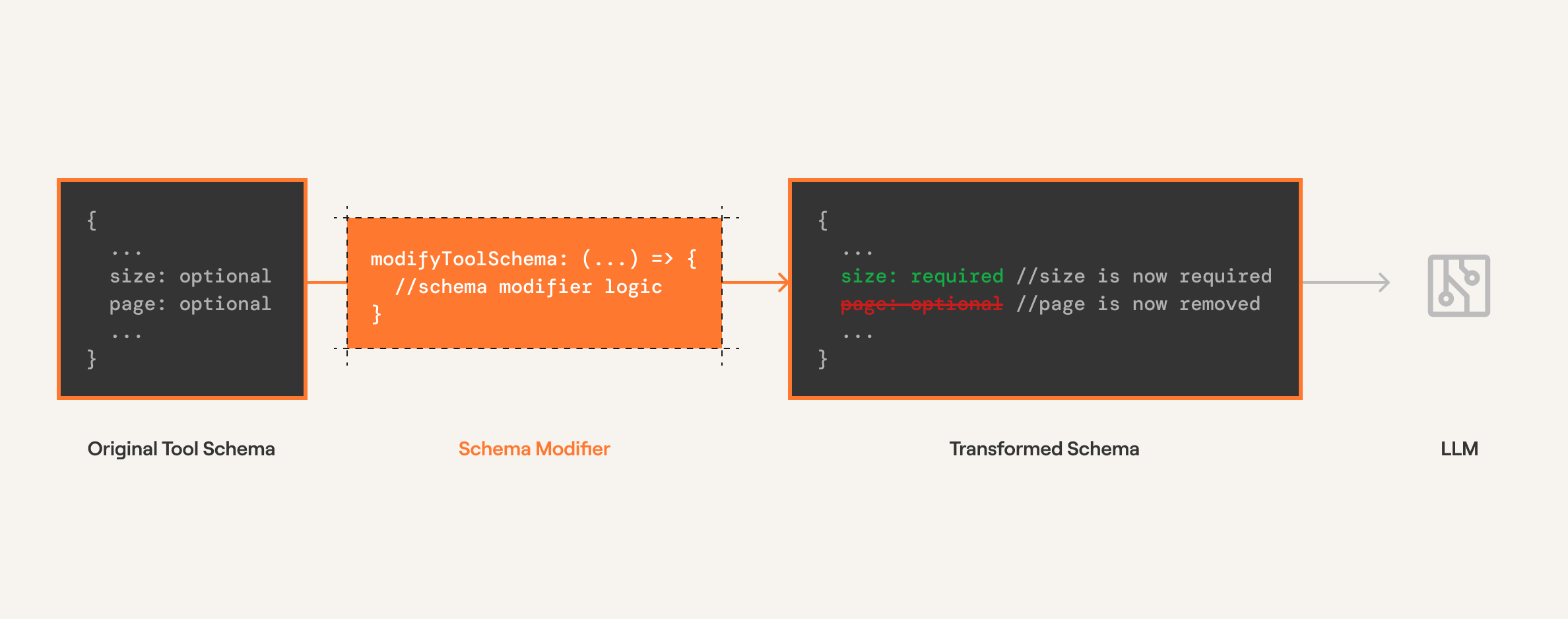
Schema modifiers transform a tool's schema before the tool is seen by an agent.
Useful for:
- Modifying or rewriting the tool description to better fit your use case
- Adding arguments to the tool (e.g., adding a
thoughtargument to prompt the agent to explain reasoning) - Hiding arguments from the tool when they're irrelevant
- Adding extra arguments for custom use cases
- Adding default values to tool arguments
Below we modify the schema of HACKERNEWS_GET_LATEST_POSTS to make the size argument required and remove the page argument.
from composio import Composio, schema_modifier
from composio.types import Tool

user_id = "your@email.com"

@schema_modifier(tools=["HACKERNEWS_GET_LATEST_POSTS"])
def modify_schema(
    tool: str,
    toolkit: str,
    schema: Tool,
) -> Tool:
    _ = schema.input_parameters["properties"].pop("page", None)
    schema.input_parameters["required"] = ["size"]
    return schema

tools = composio.tools.get(
    user_id=user_id,
    tools=["HACKERNEWS_GET_LATEST_POSTS", "HACKERNEWS_GET_USER"],
    modifiers=[
        modify_schema,
    ]
)
const userId = "your@email.com";
const tools = await composio.tools.get(
userId,
{
tools: ["HACKERNEWS_GET_LATEST_POSTS", "HACKERNEWS_GET_USER"],
},
{
modifySchema: ({ toolSlug, toolkitSlug, schema }) => {
if (toolSlug === "HACKERNEWS_GET_LATEST_POSTS") {
const { inputParameters } = schema;
if (inputParameters?.properties) {
delete inputParameters.properties["page"];
}
inputParameters.required = ["size"];
}
return schema;
},
}
);
console.log(JSON.stringify(tools, null, 2));With the modified tool schema, the page argument is removed and size is required.
Example: Modifying the tool description
Sometimes you need to provide additional context to help the agent understand how to use a tool correctly. This example demonstrates modifying the description of GITHUB_LIST_REPOSITORY_ISSUES to specify a default repository.
This approach is useful when you want to guide the agent's behavior without changing the tool's underlying functionality.
In this example:
- We append additional instructions to the tool's description
- The modified description tells the agent to use
composiohq/composioas the default repository - This helps prevent errors when the agent forgets to specify a repository parameter
from composio import Composio, schema_modifier
from composio.types import Tool
from composio_google import GoogleProvider
from google import genai
from uuid import uuid4

composio = Composio(provider=GoogleProvider())
client = genai.Client()
user_id = uuid4()

@schema_modifier(tools=["GITHUB_LIST_REPOSITORY_ISSUES"])
def append_repository(
    tool: str,
    toolkit: str,
    schema: Tool,
) -> Tool:
    schema.description += " When not specified, use the `composiohq/composio` repository"
    return schema

tools = composio.tools.get(
    user_id=user_id,
    tools=["GITHUB_LIST_REPOSITORY_ISSUES"],
    modifiers=[append_repository]
)

print(tools)
import { Composio } from '@composio/core';
import { VercelProvider } from '@composio/vercel';
import { v4 as uuidv4 } from 'uuid';
const userId = uuidv4();
const composio = new Composio({
apiKey: process.env.COMPOSIO_API_KEY,
provider: new VercelProvider(),
});
const addDescription = ({ toolSlug, toolkitSlug, schema }) => {
if (toolSlug === 'GITHUB_LIST_REPOSITORY_ISSUES') {
schema.description += 'If not specified, use the `composiohq/composio` repository';
}
return schema;
};
const tools = await composio.tools.get(
userId,
{
tools: ['GITHUB_LIST_REPOSITORY_ISSUES'],
},
{
modifySchema: addDescription,
}
);
console.log(tools);